About these pages
I built these pages completely without a back end (just a static HTTP server), and with no front end build. 🤯🚀 Pure HTML, CSS, and some Javascript to help. 🥰
It is the result of me looking to create a page for my company. I checked out all the usual suspects. Squarespace, Wix, WordPress or something different like Hugo. But I got really curious: Is it possible to remove all the complexity and go "naked?" After all, I did write quite a lot of HTML tables back in the nineties. 😜
Could I do it even if I wanted templating, re-usable fragments and a blog like index page that shows all entries? I asked Google Gemini about it, and it gave me some nice pointers. Vanilla seemed tempting.
So I started digging. And digging. And spending way too much time. With Web Components, Shadow DOM and slots. And I got there. Kind of. Read on for the details.
Oh, and I am mainly a back end guy. If you didn't catch that yet.
Why?
I am a minimalist when it comes to build processes. I want a short distance between the code I write and the executing code. Things like code generation have always gotten in the way. There has to be a simpler solution.
Sometimes you have to take a step back and get a fresh perspective. And lately I have been inspired by many of the things HTMX does as well as by David Heinemeier Hansson's writings on #nobuild. There is a simpler world out there to explore.
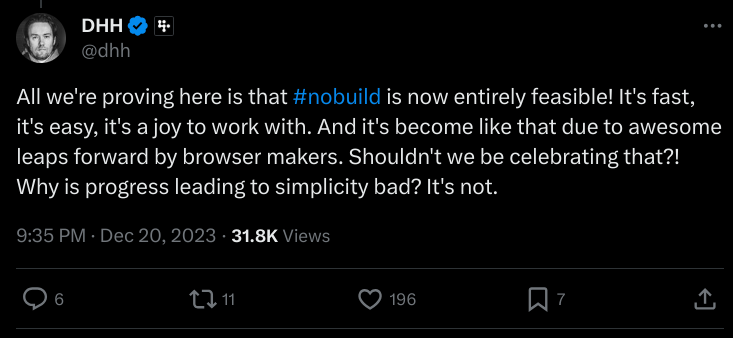
I actually tried embedding the Tweet here, but the Twitter API widget does not support the Shadow DOM. (https://devcommunity.x.com/t/cant-embed-tweets-in-shadow-dom/141665)
I am amazed at what you can do with CSS and HTML these days, and thought it could be fun to find out what you can do with web components too.
The solution
This is a short description of some of the things I have built. It is important to note that I really only needed one page, but wanted to see if I could make this work. 🤓 Here goes:
-
A tag to include HTML fragments:
<include-html path="/parts/links.html"></include-html>- Does an HTTP request to get the fragment, with caching to avoid duplicate requests
- Does NOT use Shadow DOM, so included content inherits parent styles naturally
- Click this link to view the source of the web component
-
A tag to wrap the contents of a page in a common template:
<page-component>[...page HTML content...]</page-component>- The layout HTML is inlined directly in the JavaScript file as a skeleton. That removes the HTTP request the layout used to need, which was the worst source of layout shift. It doesn't eliminate shift entirely — the component still mounts after the browser has painted, so there is some movement left. Critical CSS is inlined in the skeleton so the header and footer look right immediately.
- Page content is placed in the light DOM rather than the shadow tree, so your own page styles and in-page anchors keep working normally.
- CSS is loaded via adoptedStyleSheets for better performance - no flash of unstyled content.
- You can use View Source in
your browser
to see the usage of
<page-component>on this page. - Click this link to view the source of the web component
- A blog like index page. I have to fetch a TXT file with the names of the independent blog files. It has to be maintained independently, but it kind of works. Use "view source" on the blog link, to see how.
Some reflections
- Working with the Shadow DOM is not trivial, and you can easily get lost.
Adding elements,
finding templates and juggling shadow and regular can be mind-boggling.
In-page links (
href="#id") didn't work at all for a long time, which turned out to be the giveaway: the content didn't belong in the shadow tree. Now only the header, footer and their styles live there, the page content sits in the light DOM, and anchors work again. Maybe something like Lit would be a better solution, but I wanted to stay quite bare bones for now. - In the templating solution, you need to use
<template>tags to make sure the content is not displayed before the web component is fully loaded (and styled). Hiding it this way creates less of a flickering effect in the start, but may generate bigger layout shifts. -
Update: I managed to get excellent Lighthouse scores on the main page!
The key was inlining a skeleton layout with critical CSS directly in the JavaScript,
so the page structure is correct from the first paint.
Then the full styles are applied via
adoptedStyleSheetswithout replacing the DOM. There is still measurable layout shift, and it is worse on a phone than on a desktop. Two things cause it: the<include-html>fragments, whose size isn't known beforehand, and the component itself mounting after the first paint. That is the honest trade-off of doing the layout in JavaScript with no build step.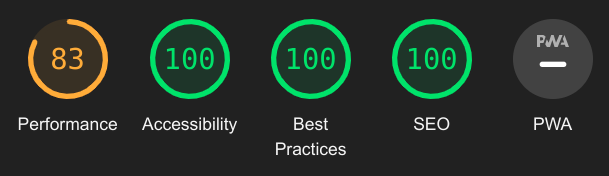
- Image optimization matters: I had icon images at 512x512 pixels that were displayed at 20x20. Resizing them to 40x40 (for retina displays) brought the twelve icons down to about 48KB in total. A simple win that Lighthouse flagged immediately.
-
The same mistake, bigger: the hero photo was a wide landscape image
that CSS then cropped to a tall portrait with
object-fit: cover, so more than half of every downloaded pixel was thrown away. Worse, the<link rel="preload">picked its file fromimagesrcsetwhile the<picture>picked its own frommedia— so they disagreed and the browser downloaded both. Cropping the file to the ratio it is actually displayed at, and letting the preload and the image select the exact same way, took it from 453KB over two requests to one at 201KB. - Some things still don't play well with the Shadow DOM. As an example, I was not able to use the Twitter widget inside the page.
- Writing in HTML isn't too bad, but Markdown is better. The Upside is that any time you need something special, you can make it. I'll have to research Markdown with some kind of HTML fragments.
Should you do this?
Probably not. 😊 But it has been a fun learning experience figuring out how the basics that the modern web is built on works. And a return to my good old HTML roots.
I don't think you should use React (or something similar) for a simple site/blog. Most things you want to do can easily be implemented in pure HTML and CSS in modern browsers. You probably want something to handle some consistency when it comes to titles, lists, tags, templates plus plus.
Gut feeling: Use something like Sanity.io and create a simple front end in HTML/JS/CSS. That probably covers most of what you need right there.
Let me know what you think! Except there's no comment field here as this is a totally static page. 😉 So hit my e-mail below.